
搜索页面排序 (SERP Ranking)
搜索页面排序使用说明
搜索页面排序可以理解为“根据搜索判断哪些结果相关、整体质量如何、你有多确定”:上方显示查询词,中间是可多选的搜索结果列表,底部补充搜索质量星级与标注置信度。该模板适用于搜索引擎排序评估、检索模型重排训练与人工质检场景。
标注核心作用
- 结果多选标注:支持一次标记多个相关结果,贴合真实检索场景;
- 质量信号增强:
Rating提供查询级别整体质量分; - 置信度补充:低/高置信度可用于后续样本加权与复核分流。
基础操作步骤
- 阅读查询词,明确用户意图;
- 在结果列表中勾选相关项,支持多选与嵌套项;
- 对当前搜索结果整体质量进行星级评分;
- 选择“低/高置信度”并提交。
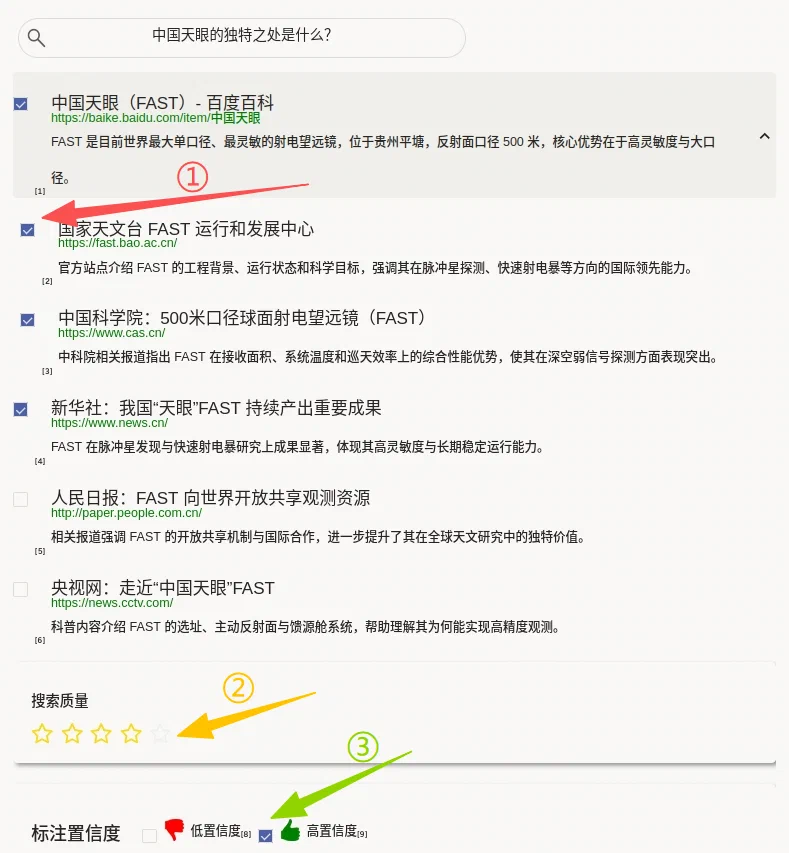
说明:遇到边界样本时,先按相关性标准打标,再用“低置信度”标记不确定样本,便于二次复核。
注意事项
selection="checkbox"与choice="multiple"表示结果可多选;allownested="true"支持父子结果结构,注意父子项的相关性独立判断;showInLine="true"为当前模板写法,如平台仅识别showInline,请按运行环境调整。
模板预览
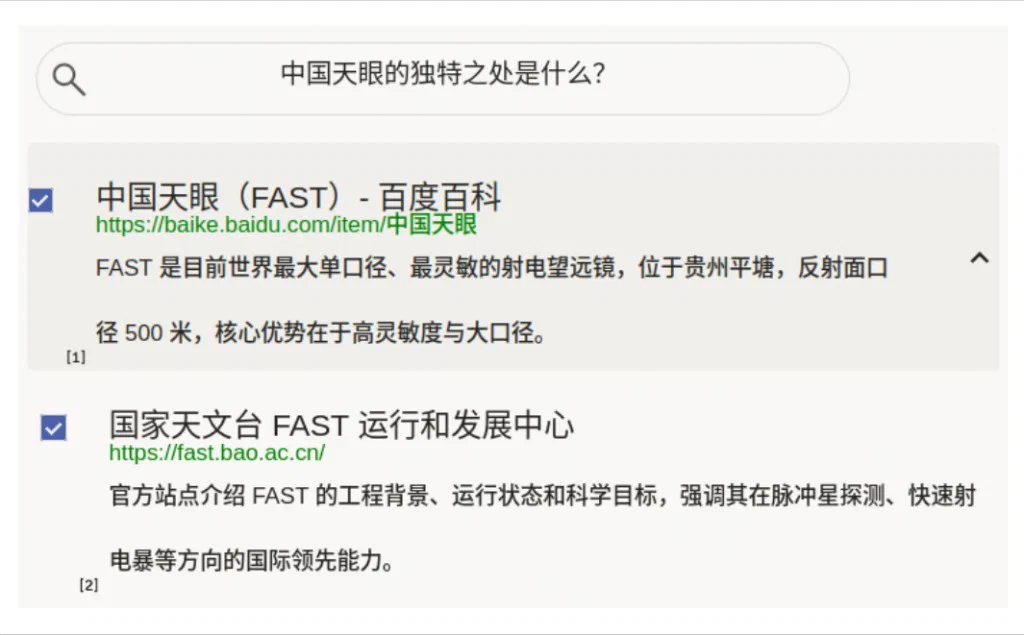
模板配置
完整代码块
<View>
<View style="margin:5px; width:575px; border-radius:30px; border:1px solid #dcdcdc; height:45px; width:500px; font-size:16px; display: flex; justify-content: center; padding: 8px; outline: none; background-image: url('https://htx-pub.s3.amazonaws.com/samples/google-search-magnifying-glass-icon-5.jpeg'); background-position: left center; background-size: 24px; background-repeat: no-repeat; background-origin: content-box; ">
<Text name="text" value="$text"/>
</View>
<View className="dynamic_choices">
<Choices name="dynamic_choices" toName="text" selection="checkbox" value="$options" layout="vertical" choice="multiple" allownested="true"/>
</View>
<View style="box-shadow: 2px 2px 5px #999; padding: 20px; margin-top: 1em; border-radius: 5px;">
<Header value="搜索质量"/>
<Rating name="relevance" toName="text"/>
</View>
<View style="box-shadow: 2px 2px 5px #999; padding: 15px 5px 10px 20px; margin-top: 1.5em; margin-bottom: 1.25em; border-radius: 5px; display: flex; align-items: center;">
<Header value="标注置信度" style="font-size: 1.25em"/>
<View style="margin: 0 1em 0.5em 1.5em">
<Choices name="confidence" toName="text" choice="single" showInLine="true">
<Choice value="低" html="<span style='display:inline-flex;align-items:center;gap:6px;'><img width='24' src='/static/templates/project-templates-config/ranking-and-scoring/serp-ranking/confidence-low.png'/><span>低置信度</span></span>"/>
<Choice value="高" html="<span style='display:inline-flex;align-items:center;gap:6px;'><img width='24' src='/static/templates/project-templates-config/ranking-and-scoring/serp-ranking/confidence-high.png'/><span>高置信度</span></span>"/>
</Choices>
</View>
</View>
</View>搜索页面排序配置代码说明
1、查询展示:顶部 Text name="text" 模拟搜索框显示用户查询。
2、结果标注:Choices name="dynamic_choices" 动态注入 $options,支持多选、纵向展示和嵌套结构。
3、质量评分:Rating name="relevance" 记录查询级整体结果质量。
4、置信度:Choices name="confidence" 记录当前标注确定程度。
5、样式:Style 控制结果标题、链接、说明文字等 SERP 风格显示。
示例数据(简要)
{
  "data": {
    "text": "中国天眼的独特之处是什么?",
    "options": [
      {
        "html": "<div class=\"searchresultsarea\"><div class=\"searchresult\"><h2>中国天眼(FAST)- 百度百科</h2><a href='500米口径球面射电望远镜' target='_blank'>https://baike.baidu.com/item/中国天眼</a> <p>FAST 是目前世界最大单口径、最灵敏的射电望远镜,位于贵州平塘,反射面口径 500 米,核心优势在于高灵敏度与大口径。</p></div>",
        "value": "result1",
        "children": [
          {
            "html": "<div class=\"searchresultsarea\"><div class=\"searchresult\"><h2>国家天文台 FAST 运行和发展中心</h2><a href='https://fast.bao.ac.cn/' target='_blank'>https://fast.bao.ac.cn/</a> <p>官方站点介绍 FAST 的工程背景、运行状态和科学目标,强调其在脉冲星探测、快速射电暴等方向的国际领先能力。</p></div>",
            "value": "result11",
            "selected": true
          },
          {
            "html": "<div class=\"searchresultsarea\"><div class=\"searchresult\"><h2>中国科学院:500米口径球面射电望远镜(FAST)</h2><a href='https://www.cas.cn/' target='_blank'>https://www.cas.cn/</a> <p>中科院相关报道指出 FAST 在接收面积、系统温度和巡天效率上的综合性能优势,使其在深空弱信号探测方面表现突出。</p></div>",
            "value": "result12"
          }
        ]
      },
      {
        "html": "<div class=\"searchresultsarea\"><div class=\"searchresult\"><h2>新华社:我国“天眼”FAST 持续产出重要成果</h2><a href='https://www.news.cn/' target='_blank'>https://www.news.cn/</a> <p>FAST 在脉冲星发现与快速射电暴研究上成果显著,体现其高灵敏度与长期稳定运行能力。</p></div>",
        "value": "result2"
      },
      {
        "html": "<div class=\"searchresultsarea\"><div class=\"searchresult\"><h2>人民日报:FAST 向世界开放共享观测资源</h2><a href='http://paper.people.com.cn/' target='_blank'>http://paper.people.com.cn/</a> <p>相关报道强调 FAST 的开放共享机制与国际合作,进一步提升了其在全球天文研究中的独特价值。</p></div>",
        "value": "result4"
      },
      {
        "html": "<div class=\"searchresultsarea\"><div class=\"searchresult\"><h2>央视网:走近“中国天眼”FAST</h2><a href='https://news.cctv.com/' target='_blank'>https://news.cctv.com/</a> <p>科普内容介绍 FAST 的选址、主动反射面与馈源舱系统,帮助理解其为何能实现高精度观测。</p></div>",
        "value": "result5"
      }
    ]
  }
}
说明
- 代码可直接复制到标注配置文件中使用;
options支持children嵌套和默认选中状态;- 可按业务替换查询词、搜索结果与置信度图标资源路径。